Usage
To use this plugin in your nmk project, insert this reference in your nmk.yml main file:
refs:
  - pip://nmk-doc!plugin.yml
Then you can start writing documentation by adding an index.md file in your project doc sub-folder. Once done, nmk build will:
generate the sphinx conf.py file in the doc sub-folder
build the documentation; you can check the result by browsing the out/doc/index.html file
This plugin also enables images generation from PlantUML diagrams. If you add some .puml diagram files in your project diagrams sub-folder, nmk build will:
download the PlantUML runtime
generate all images from your .puml diagrams; you can check the result by browsing the doc/diagrams folder
Note
PlantUML is a java application, so java needs to be installed on your system. See nmk-base java handling for more information on how java is detected.
However if java is not detected, the build won’t fail (a warning will be displayed instead).
Here is an example of an image generated from a PlantUML diagram:
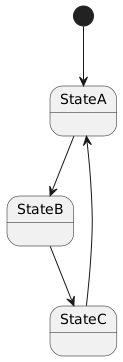
Diagram source code:
@startuml my-sample-diagram

[*] --> StateA
StateA --> StateB
StateB --> StateC
StateC --> StateA

@enduml